Allure: A Stylish Script Font for Web Design
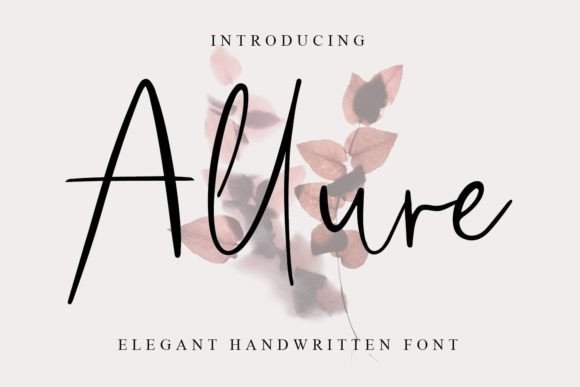
Allure is a graceful handwritten font that brings elegance and personality to digital design. As a web designer, I appreciate fonts that can elevate the visual appeal of a site while maintaining clarity and readability. Allure fits this need perfectly, offering a refined script style that works well in both formal and casual contexts.
With its flowing lines and subtle flourishes, Allure adds a touch of sophistication to any layout. It’s ideal for headers, logos, and decorative elements where a personal, artistic feel is desired. The font’s balance between legibility and charm makes it a valuable addition to any digital toolkit.
Using Allure in Web Design
When designing for the web, choosing the right font is crucial for creating a strong visual hierarchy. Allure excels in headline roles, such as hero sections, call-to-action buttons, and section titles. Its unique character helps draw attention without overwhelming the viewer.
In a creative portfolio, for example, Allure can be used to highlight project titles or taglines. On a boutique online store, it can add a personal touch to banners and product headings. For a coaching website, it can reinforce a professional yet approachable brand tone.
The font also works well in social media graphics and digital ads, where a distinctive look can help stand out in a crowded space. Its versatility allows it to adapt to different design styles while maintaining a cohesive aesthetic.
Readability and Digital Usability
While Allure is a decorative font, it remains readable at larger sizes, making it suitable for headlines and short phrases. When used in smaller text, such as on mobile screens or dark backgrounds, it’s important to ensure sufficient contrast and spacing for optimal legibility.
For responsive layouts, consider using Allure only for key visual elements rather than body text. Pairing it with a clean sans serif font can create a balanced and modern look. This combination helps maintain readability while allowing Allure to shine in prominent areas.
On image overlays or light backgrounds, Allure can add a soft, elegant touch. However, avoid using it in complex or cluttered designs where it might become difficult to read. Always test the font in different contexts to ensure it meets your design goals.
Brand Identity and User Engagement
A strong brand identity relies on consistent typography, and Allure can play a key role in this. Its personality aligns well with brands that want to convey creativity, professionalism, or a personal touch. Whether it’s a lifestyle blog, a SaaS landing page, or an online course, Allure can help shape the visual tone of the site.
Using Allure in logos or header text can enhance user engagement by creating a memorable visual signature. It encourages users to interact with the content and builds trust through a polished, cohesive design. When paired with other design elements, it contributes to a more immersive and professional experience.
Practical Applications for Digital Creators
For a digital product creator, Allure can be a powerful tool in branding and marketing materials. It works well in email newsletters, banner ads, and promotional content where a stylish, handwritten feel is desired. Its ability to blend with different design styles makes it a flexible choice for various projects.
On a course sales page, Allure can be used to highlight key benefits or testimonials, adding a human element to the copy. In a blog header, it can set the tone for the content and make the site more visually engaging. For an online store, it can be used in product titles or promotional banners to attract attention and drive conversions.
Font Pairing and Design Integration
Pairing Allure with other fonts can enhance its impact and create a more dynamic layout. A common approach is to use it as a display font alongside a simple sans serif for body text. This pairing ensures clarity while allowing Allure to stand out in key areas.
For editorial designs, combining Allure with a serif font can create a classic, sophisticated look. In modern web design, pairing it with a clean, geometric typeface can add contrast and visual interest. Experimenting with different pairings helps find the right balance for each project.
When integrating Allure into a design, consider the overall layout and how the font interacts with other elements. Use it strategically to guide the user’s eye and emphasize important information. Avoid overusing it in large blocks of text, as this can reduce readability and detract from the overall design.
Commercial Licensing and File Formats
Before using Allure in a commercial project, it’s important to check the licensing terms. Most premium fonts offer different licenses for websites, client projects, and online stores. Ensure that the license covers your intended use to avoid legal issues.
Allure is typically available in multiple file formats, including OTF and TTF, making it easy to integrate into design software and web projects. Some versions may include alternate characters, ligatures, and weights, providing more flexibility for different design needs.
For web use, check if a webfont version is available. This ensures the font loads correctly across different devices and browsers. If not, consider using a fallback font to maintain consistency in case the custom font fails to load.
Support for multilingual characters is also important for global audiences. Ensure that Allure includes the necessary glyphs for your target language to maintain a professional appearance across all content.